Scheduler
Energy Logserver 8.0 introduces a unified Scheduler that collects every scheduled task from across the product, Archive, Index Management, Sync/Copy, into one view, with full execution history for each run. Administrators can see at a glance what runs when, whether past runs succeeded, and how long they took.
Accessing the Scheduler
Open Sources from the sidebar (Management group), then switch to the Scheduler tab. The scheduler also has a direct URL: /app/scheduler/jobs.
The page opens on Jobs Overview.
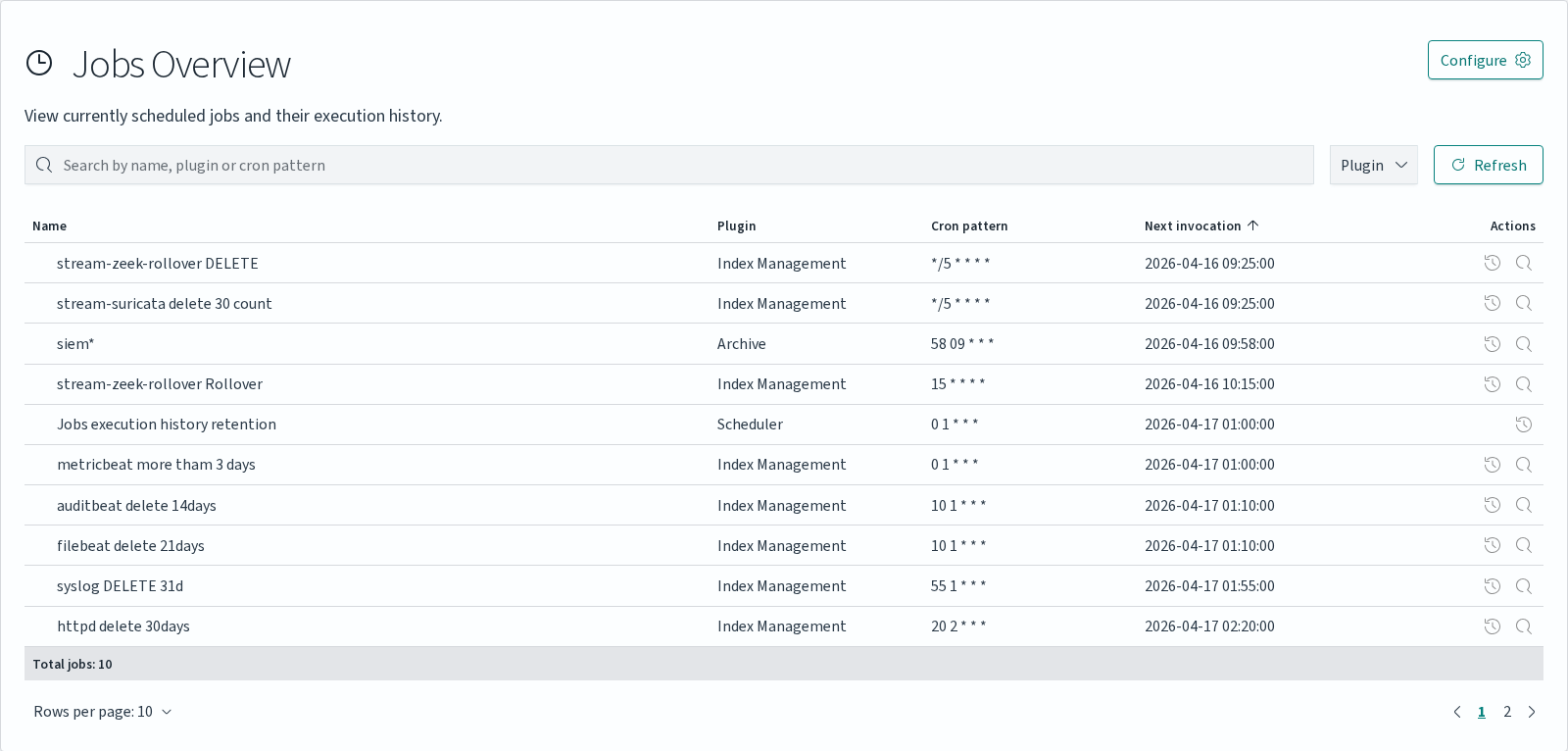
Jobs Overview
The Jobs Overview table lists every scheduled task currently registered in the cluster, regardless of the module that created it.
Column |
Description |
|---|---|
|
Task name as defined in the originating module. |
|
Module that owns the task: Index Management, Archive, Reports, or Scheduler (Sync/Copy). |
|
Cron expression controlling when the task runs. |
|
Date and time of the next scheduled run. |
|
Open the execution history modal for that task, or Go to plugin to open the module that owns it. |
Use the Plugin dropdown in the toolbar to filter the list to a single module. The Refresh button reloads the table without leaving the page.
Execution History
Click the action icon on a task row to open the Execution history modal.
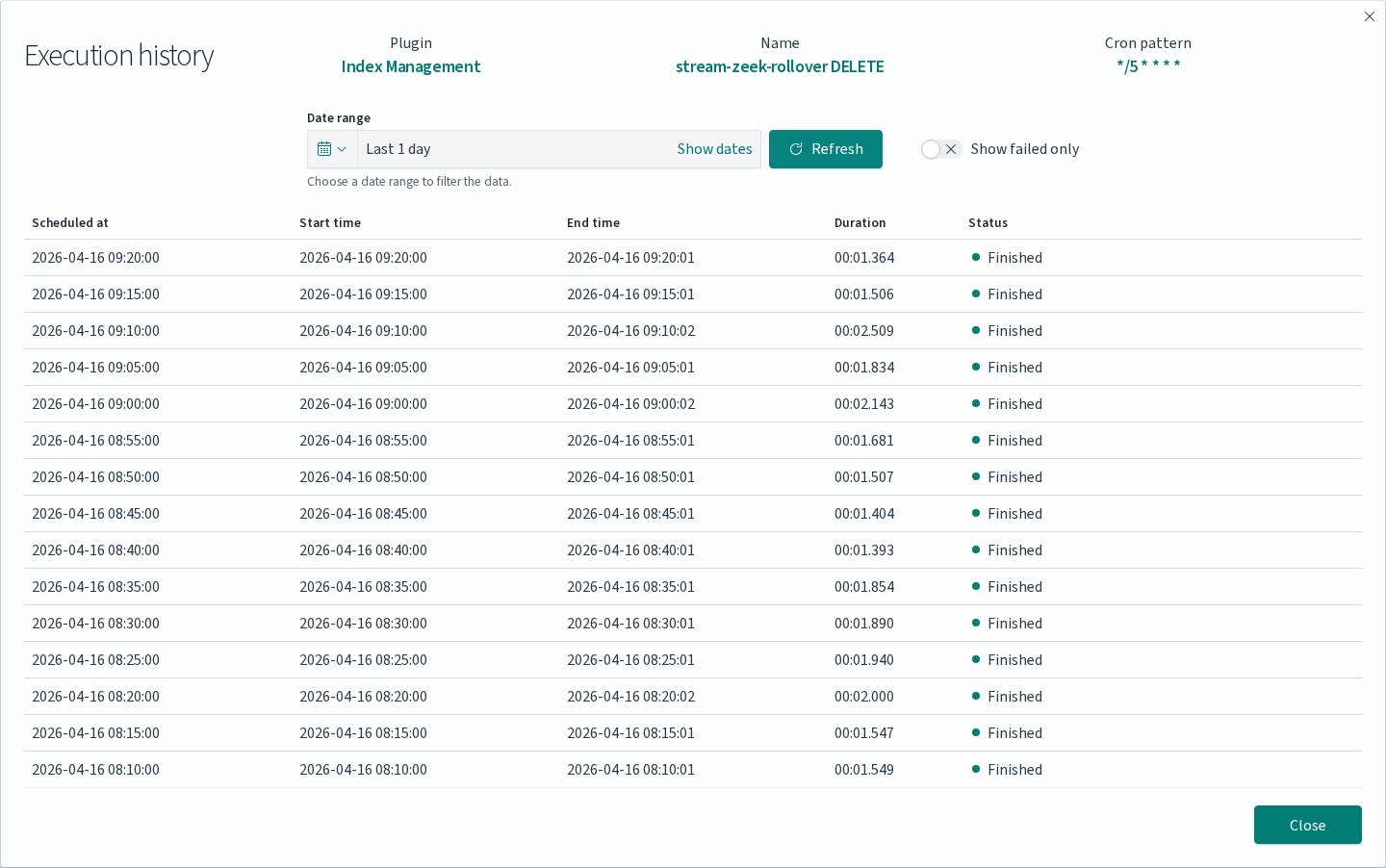
The modal shows every recorded run of the task within the selected date range:
Column |
Description |
|---|---|
|
Time at which the scheduler was supposed to fire the task. |
|
Time at which the task actually started running. |
|
Time at which the task finished (or aborted). |
|
Wall-clock time between Start and End. |
|
Finished for a successful run, Failed for an error. |
Controls at the top of the modal:
Date range picker: defaults to Last 1 day; supports absolute ranges and arbitrary quick options.
Show failed only: hides successful runs, useful when auditing reliability.
Refresh: reloads the history without closing the modal.
The history only goes back as far as the configured retention period (see next section).
Configuring History Retention
Execution history is kept for a fixed number of days, configurable cluster-wide.
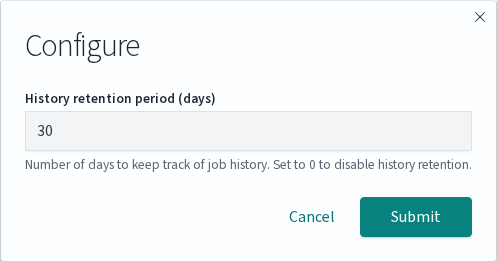
Click Configure in the Jobs Overview toolbar to open the settings modal.
Field |
Description |
|---|---|
|
Number of days of job history to keep. Defaults to 30. Set to 0 to disable history retention entirely. |
Disabling history (0) stops the scheduler from recording new executions but does not remove existing records immediately; older entries are pruned as their retention window expires.
Module Integration
Each module that schedules work exposes its own management view in addition to appearing in the central Jobs Overview. Use the module view to create and edit tasks; use the Scheduler to audit their execution.
Module |
Where tasks are created |
What appears in Scheduler |
|---|---|---|
Archive |
Archive app → Archive tab → Create Task (supports |
All scheduled archive tasks with their cron patterns. |
Index Management |
Index Management app → Create Action (tasks flagged |
Rollover, delete, close and custom index management actions running on a schedule. |
Sync/Copy |
Sources → Sync/Copy tab |
Index replication and synchronisation tasks. |
Reports |
Reports app → Data Export tab → Create Task with Scheduling enabled |
Scheduled exports, named for example |
Tasks that are defined but not scheduled (for example, Index Management actions flagged Scheduled: No) do not appear in Jobs Overview, they run only on demand.