Sidebar Navigation
The sidebar menu provides access to all modules and tools in Energy Logserver. Open it by clicking the hamburger icon in the upper left corner of the interface.
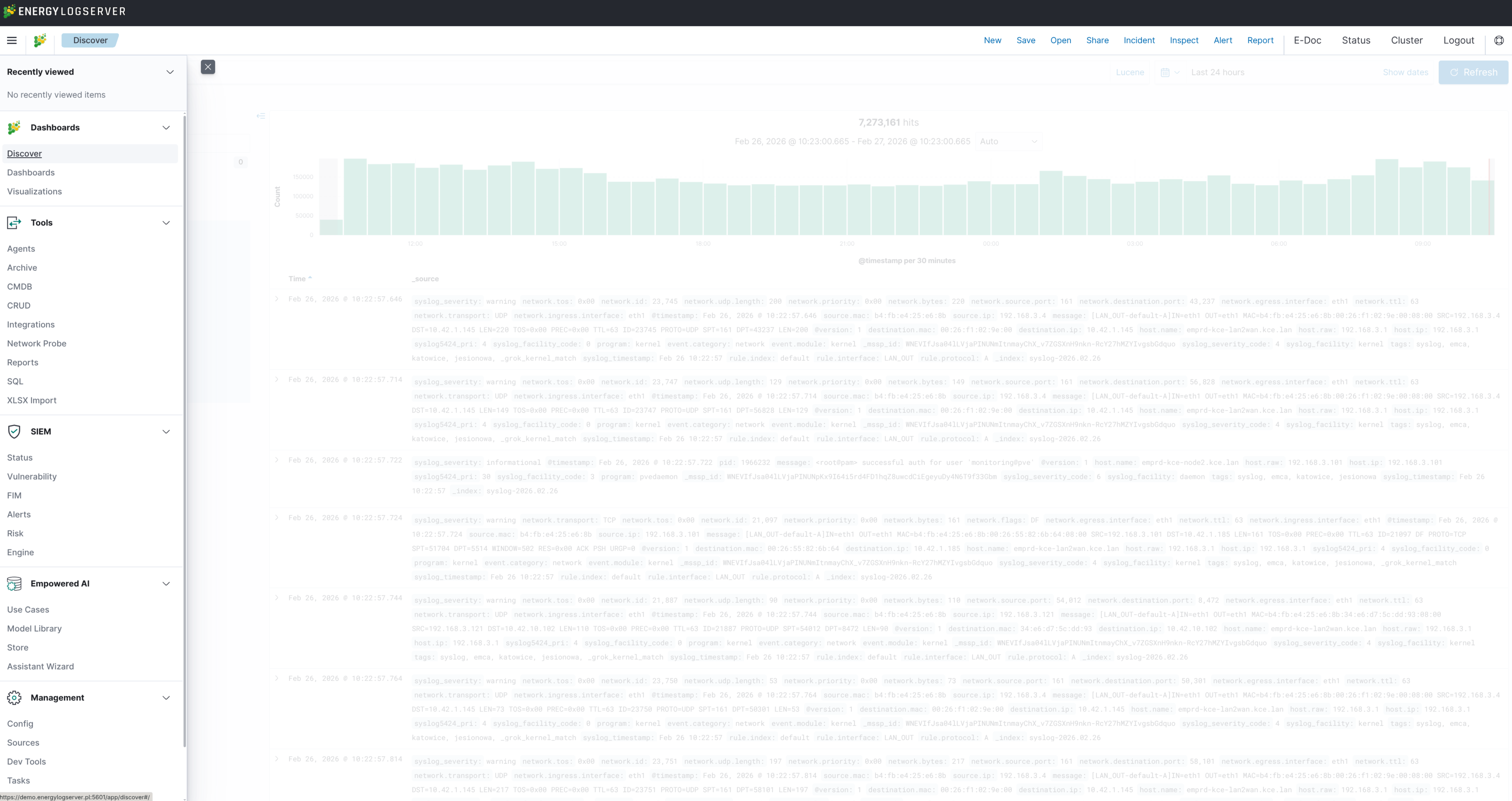
Note
The sidebar shows only the modules listed in the Apps field of the user’s role, so what you see
depends on the role you log in with and on which components are installed. The admin role sees
every installed module. See Role-Based Access Control
for how Apps are assigned. The screenshot above may differ from your environment.
Menu Structure
The sidebar is organized into the following categories:
Recently Viewed
Displays a list of recently accessed dashboards, visualizations, and saved searches for quick navigation.
Dashboards
Data exploration and visualization:
Item |
Description |
|---|---|
Discover |
Interactive data exploration interface for searching and filtering log events |
Dashboards |
Create, open, and manage dashboards composed of visualizations |
Visualizations |
Build and edit data visualizations (charts, tables, maps, metrics) |
Tools
Operational modules:
Item |
Description |
|---|---|
Agents |
Agent inventory and configuration, see Agents |
Archive |
Long-term archiving and retrieval of index data, see Archive |
Automation |
n8n workflow engine integration, opened in a new browser tab. Shown only when |
CMDB |
Asset inventory and infrastructure relations, see CMDB |
CRUD |
Document management interface for custom indices |
Integrations |
Plugin catalog for pipelines, dashboards, and alert rules, see Integrations |
Network Probe |
Probe, pipeline, and file management, see Management Interface |
Reports |
Scheduled and on-demand report generation and export |
SQL |
SQL and PPL query interface, see SQL Query Language |
XLSX Import |
Import data from XLSX spreadsheet files into indices |
Note
Several of these modules open only for the admin role: Agents, Archive, CMDB, CRUD, Integrations,
Network Probe, and XLSX Import. Another role can still have them in its Apps list and reach the
page, but the page then reports “This page is accessible for administrator users only.” Reports is
gated differently, at the API level, where the report role is accepted alongside admin.
SIEM
Security Information and Event Management modules for threat detection and incident handling:
Item |
Description |
|---|---|
Status |
SIEM operational status overview and health indicators |
Vulnerability |
Vulnerability detection and assessment results |
FIM |
File Integrity Monitoring, tracks changes to critical system files |
Alerts |
Alert rule management, incident handling, and notification configuration |
Risk |
Risk scoring and risk-based event prioritization |
SIEM Engine |
Endpoint Security engine overview, see SIEM Interface Overview |
Note
The SIEM category appears only on deployments where the SIEM Plan package is installed. Within it,
the entries follow the alerts app on the role, and incident handling additionally requires the
security or security-tenant role. SIEM Engine has its own entry in the Apps list.
Empowered AI
AI and machine learning capabilities:
Item |
Description |
|---|---|
Use Cases |
Manage configured AI detection rules, scheduling, and execution status |
Model Library |
Browse and manage trained AI models |
Store |
Download pre-built AI use cases from the online store |
Assistant Wizard |
Configure AI Assistant providers and prompts |
Note
The Empowered AI entries follow the intelligence app on the role. The AI Assistant itself is
license-gated separately: it is enabled only when the active license carries the aiAssistant flag,
see Licensing.
Management
System administration and configuration tools:
Item |
Description |
|---|---|
Config |
Application configuration settings, license management, and user administration |
Sources |
Data source approval and management within the license limit, visible to administrators only, see MSSP Configuration |
Tasks |
Background task queue, view status and history of scheduled and on-demand tasks |
Index Management |
Index lifecycle management, index settings, and data operations. When deleting indices, a confirmation warning is displayed to prevent accidental data loss. |
Management |
Saved objects, advanced settings, and index pattern management |
Dev Tools |
Developer console for direct API interaction and Query Workbench |